
A squash tournament is an organised competition where players compete in a structured draw format — typically single elimination, double elimination, round-robin, or group stages into knockouts. Running one involves five phases: planning (date, venue, format, categories), registration (collecting entries and payments), draw creation (seeding and scheduling), match day operations (scoring, logistics), and post-event (publishing results and updating ratings).
Running a squash tournament doesn't have to be complicated. Whether you're organising your first club championship or a regional open, the process is the same: get entries, create draws, run matches, publish results.
This guide covers everything from planning to post-event, with practical advice from organisers who've done it hundreds of times.
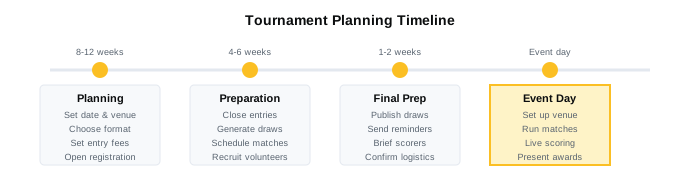
Before the Tournament
1. Set the Basics
Nail these down first:
- Date and venue — Check court availability. Avoid clashing with other local events.
- Format — Elimination, round-robin, or group stages into knockouts? (More on this below.)
- Categories — Men's Open, Women's B, Over-50s, Juniors? Define who can enter each.
- Entry fee — Cover costs, fund prizes, or just break even. Typical club events charge $10-30.
- Entry deadline — Give yourself time to create draws. 3-7 days before the event works.
2. Choose Your Format
Single elimination
- Lose once, you're out
- Fast, clean, works for any size
- Downside: players travel for one match and go home
Double elimination
- Lose twice before you're out
- More matches per player
- More complex to schedule
Round-robin
- Everyone plays everyone in their group
- Best for small fields (4-8 players)
- Every player gets multiple matches
Group stages + knockout
- Round-robin groups, top players advance to elimination bracket
- Best of both worlds
- Works well for 12-32 players
Box league format
- Ongoing league, not a single-day event
- Players arranged in boxes of 4-6, play within their box over weeks
- Great for club internal competition
3. Set Up Registration
Options:
Spreadsheet + email Works for tiny events. Falls apart at 20+ entries. You'll chase payments manually.
Google Form Better. Collects entries in one place. Still no payment integration.
Tournament platform Best. Players register and pay in one step. You get a confirmed entry list, not promises. Draw generation is automatic.
Whatever you use, collect:
- Name
- Contact (email or phone)
- Category entering
- Current rating or skill level (for seeding)
Creating the Draw
Seeding
Seeding prevents your two best players meeting in round one. Use ratings if you have them. Otherwise, estimate based on known ability.
For a 16-player elimination draw:
- Seed 1 plays the lowest seed (16) in round one
- Seed 2 plays 15
- Seeds 1 and 2 can only meet in the final
Most tournament software handles this automatically.
Draw Size
Elimination brackets work cleanly with 4, 8, 16, 32, 64 players. If you have 12 entries, either:
- Give top 4 seeds a first-round bye (they skip to round 2)
- Use a group stage format instead
Publishing the Draw
Get draws out 24-48 hours before the event. Players need to know when they're playing so they can plan travel and warm-up.
Include:
- Match times
- Court assignments
- Who they're playing (with contact info if matches are self-scheduled)
Tournament Day
Scheduling
Rule of thumb: allow 45-60 minutes per match slot, depending on format:
- Best-of-3 to 11: 30-40 minutes
- Best-of-5 to 11: 45-60 minutes
- PAR 11 is faster than point-a-rally 15
Build in buffer. Matches run long. Players arrive late. Courts need cleaning.
Running Order
For a single-day event:
- Run early rounds across all courts in parallel
- Consolidate to fewer courts as the draw shrinks
- Schedule finals for a set time so spectators can plan
Scoring
Paper score sheets Old school. Works. Someone still has to enter results into a spreadsheet later.
Live scoring (phone/tablet) Spectators follow in real time. Results feed directly into the bracket. No data entry after the match.
Designate scorers for each court — a player waiting for their next match, a volunteer, or the players themselves.
Dealing with Problems
- No-shows: Give 10-15 minutes grace, then award a walkover. State this rule upfront.
- Disputes: Tournament director decides. Their call is final.
- Injuries: Opponent advances by walkover. Injured player can continue in consolation if you have one.
- Running behind: Cut warm-up time. Run matches on all available courts.
After the Tournament
Publish Results
Don't wait. Players want to see results immediately. Post:
- Final standings
- All match scores
- Updated ratings (if you use a rating system)
Collect Feedback
Quick survey or informal chat. Ask:
- What worked?
- What didn't?
- Would you enter again?
Update Ratings
If you run a rating system, update it with all match results. This is what keeps players coming back — they want to see their rating move.
Common Mistakes to Avoid
Too many categories Three categories with 8 players each is better than six categories with 4 players each. Combine where you can.
No buffer time Matches run long. Build slack into your schedule.
Chasing payments on the day Collect payment with registration. No pay, no play.
Not publishing draws early enough Players need 24-48 hours notice. Last-minute draws mean last-minute no-shows.
No spectator-friendly results If spectators can't see scores, they lose interest. Live scoring changes this completely.
Tools You'll Need
At minimum:
- Registration system (form, spreadsheet, or platform)
- Draw generation (manual or software)
- Scoring (paper or digital)
- Communication (WhatsApp group, email list)
All-in-one platforms handle registration, draws, scoring, and results in one place. Less switching, less manual work, fewer errors.
Checklist
2-4 Weeks Before
- Confirm date, venue, courts
- Define categories and format
- Set entry fee and deadline
- Open registration
1 Week Before
- Close entries (or set final deadline)
- Generate draws with seeding
- Schedule matches
- Recruit scorers/volunteers
24-48 Hours Before
- Publish draws and schedule
- Send reminder to all players
- Confirm volunteer assignments
Tournament Day
- Arrive early, set up courts
- Brief scorers
- Run matches, update bracket
- Announce results, award prizes
After
- Publish final results
- Update ratings
- Send thank-you to players and volunteers
- Note improvements for next time
Frequently Asked Questions
How many courts do I need for a squash tournament?
It depends on the number of players and format. A 16-player single elimination tournament has 15 matches. With 2 courts and 45-minute slots (8 slots per court over 6 hours), you get 16 slots total — enough to fit in one day. For larger events or round-robin formats, add more courts or extend to two days.
How long does a squash tournament take?
A 16-player single elimination event typically takes 6-8 hours on a single day. Round-robin formats take longer — 8 players in a round-robin means 28 matches. Group stages into knockouts fall in between. Allow 45-60 minutes per match slot including buffer time.
What format should I use for a squash tournament?
Single elimination works for any size field and limited time. Round-robin is best for small groups of 4-8 where everyone should play multiple matches. Group stages into knockouts (round-robin groups, top players advance to elimination bracket) works well for 12-32 players and gives the best balance of match volume and knockout drama.
How do I seed a squash tournament draw?
Use player ratings (ELO or national rankings) to seed the top 25-50% of the draw. Place Seed 1 and Seed 2 at opposite ends of the bracket so they can only meet in the final. Seeds 1-4 should be separated so they can only meet in the semi-finals. Most tournament software handles seeding placement automatically.
How much should I charge for a squash tournament entry?
Typical club events charge $10-30 per entry. Set the fee to cover court costs, prizes, and refreshments — or just break even. Collect payment at registration time, not on tournament day, to reduce no-shows.
Next Steps
If you're running tournaments regularly — or want to start — having the right tools makes a big difference. PlayMetric handles draws, live scoring, ratings, and registration in one platform. No spreadsheets, no paper draws, no chasing results after matches.
Related Reading
- How to Create a Squash Draw
- Online Tournament Registration
- Live Scoring for Squash Tournaments
- Best Squash Tournament Software in 2026
Questions about running your tournament? Reach out at playmetric.co@gmail.com