
Live scoring means spectators, players, and remote followers see match scores update in real time — not hours later when someone enters results into a spreadsheet.
It's one of the biggest upgrades you can make to your tournament experience. Here's why it matters and how to do it.
Why Live Scoring Matters
For Spectators
Parents, partners, and supporters can follow from anywhere. They don't have to be courtside — they can watch scores from the clubhouse, car park, or another city.
At multi-court venues, spectators can track all matches simultaneously instead of running between courts.
For Players
Players waiting for their next match can see when they're likely to play. No more hovering around the control desk asking "how long until I'm on?"
After their match, they can see their result posted immediately — and their rating updated.
For Social Media
Live scores give you content. Share match updates during the event. Build engagement while it's happening, not after.
For Tournament Credibility
Live scoring makes your event feel professional. It signals you're running a real tournament, not a casual club knockabout.
What You Need
1. A Scoring Interface
Something for the scorer to input points. Options:
- Phone/tablet app or web page — most common
- Dedicated scoring tablet — one per court
- Smartwatch — hands-free option
The scorer taps to add points. The system calculates games and match scores.
2. A Display
Somewhere for spectators to see scores. Options:
- Tournament website — anyone with the link can follow
- TV/monitor at venue — shows all courts
- Projector — for big events
3. Connectivity
Scores need to sync from scoring device to display. This means:
- WiFi — most common
- Mobile data — backup if WiFi fails
Test connectivity before the event. Nothing kills live scoring like a dead zone on court 3.
Setup Options
Option A: Dedicated Hardware
Some clubs install permanent scoring systems — tablets on each court, wired to monitors, running custom software.
Pros: Reliable, professional look Cons: Expensive, maintenance required, not portable
Option B: Platform-Based (Recommended)
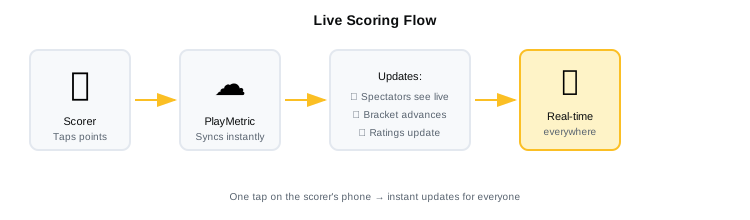
Use a tournament platform with built-in live scoring. Scorer opens a web page on their phone, enters points, scores sync to the tournament page.
Pros: No hardware to buy, works on any device, portable between venues Cons: Depends on WiFi/mobile connectivity
Option C: DIY
Build your own with spreadsheets and Google Sheets. Share a live sheet on a big screen.
Pros: Free Cons: Manual updates, no integration with draws or ratings
How to Run Live Scoring
Before the Event
- Test the system — run a mock match to confirm scoring works
- Check connectivity — verify WiFi or mobile signal on all courts
- Recruit scorers — one per court, or players score their own matches
- Brief scorers — 5-minute walkthrough of the interface
During the Event
- Scorer opens the match — finds their court/match in the system
- Scorer enters points — one tap per point
- Scores sync automatically — spectators see updates within seconds
- Match ends — result is final, feeds into bracket and ratings
Troubleshooting
| Problem | Fix |
|---|---|
| Scores not syncing | Check WiFi/mobile connection |
| Wrong score entered | Most platforms have undo; correct before moving on |
| Scorer's phone dies | Swap to another device; login with same credentials |
| Score dispute | Referee decides; scorer updates to match ruling |
Who Does the Scoring?
Option 1: Dedicated Scorers
Volunteers, parents, or off-duty players assigned to each court.
Pros: Consistent, focused Cons: Need to recruit and coordinate
Option 2: Players Score Their Own Match
One player keeps score on their phone between games.
Pros: No volunteers needed Cons: Interrupts flow, potential for disputes
Option 3: Winning Player Enters Result
Not live, but post-match entry by winner.
Pros: Simple, no volunteers Cons: Not real-time — lose the "live" benefit
For tournaments, dedicated scorers give the best experience. For leagues, player self-scoring works.
What to Display
Minimum
- Current point score
- Games in current match
- Player names
Better
- All of the above
- Match time
- Court number
- Other matches in progress
Best
- All of the above
- Live bracket showing match progression
- Rating changes post-match
- Upcoming matches
Live Scoring Platforms
Several tournament platforms include live scoring:
| Platform | Live Scoring | Notes |
|---|---|---|
| PlayMetric | Yes | Web-based, any device, feeds ratings |
| Club Locker | Yes | North America focused |
| Rankedin | Yes | Includes broadcasting features |
| Tournamentsoftware | No | Results only, not live |
If your current system doesn't support live scoring, it might be time to switch.
Common Mistakes
Not testing beforehand Always run a test match before the event. Find problems early.
Poor connectivity Squash courts are often in basements or concrete buildings. Check signal on every court.
No scorer training Even simple interfaces need a 5-minute briefing. Don't assume people will figure it out.
Forgetting to promote it Tell players and spectators that live scoring is available. Share the link. Put it on the tournament page.
Checklist
- Scoring platform selected and tested
- WiFi/mobile connectivity confirmed on all courts
- Scorers recruited and briefed
- Live scoring link shared with players and spectators
- Backup plan for connectivity issues (mobile hotspot)
- Display set up for venue spectators (TV/monitor)
Frequently Asked Questions
What do I need to set up live scoring for a squash tournament?
At minimum: a phone or tablet for each court (for the scorer to input points), a WiFi or mobile data connection, and a tournament platform that supports live scoring. Spectators follow via a shared link on any device. No special hardware required.
Do I need dedicated volunteers to do the scoring?
Not necessarily. For tournaments, dedicated scorers (volunteers, parents, or waiting players) give the best experience. For league matches, players can score their own match — one player enters the result after the match ends. The choice depends on how "live" you want the experience to be.
What happens if the WiFi drops during a match?
Most platforms queue score updates locally and sync when the connection returns. The scorer can keep entering points on their device even while offline. As a backup, bring a mobile hotspot. Always test connectivity on every court before the event.
Does live scoring work for league matches, not just tournaments?
Yes. Players can score their own league or box league matches using a phone. Results feed into standings and ratings automatically. It's less about the "spectator experience" and more about eliminating manual data entry and keeping standings current.
How long does it take to train scorers?
About 5 minutes. Most interfaces involve tapping a button when a player wins a point. Walk scorers through starting a match, entering points, and handling an undo. A quick practice rally before the first real match is usually enough.
Bottom Line
Live scoring transforms your tournament. Spectators can follow from anywhere. Players see their ratings update instantly. Your event looks professional.
The setup is minimal — a phone and WiFi. If you're still posting results hours after matches end, it's time to upgrade.
PlayMetric includes live scoring that works on any device. Results feed directly into your bracket and ratings.
Related Reading
- How to Run a Squash Tournament
- Online Tournament Registration
- Best Squash Tournament Software in 2026
Questions about setting up live scoring? Email playmetric.co@gmail.com